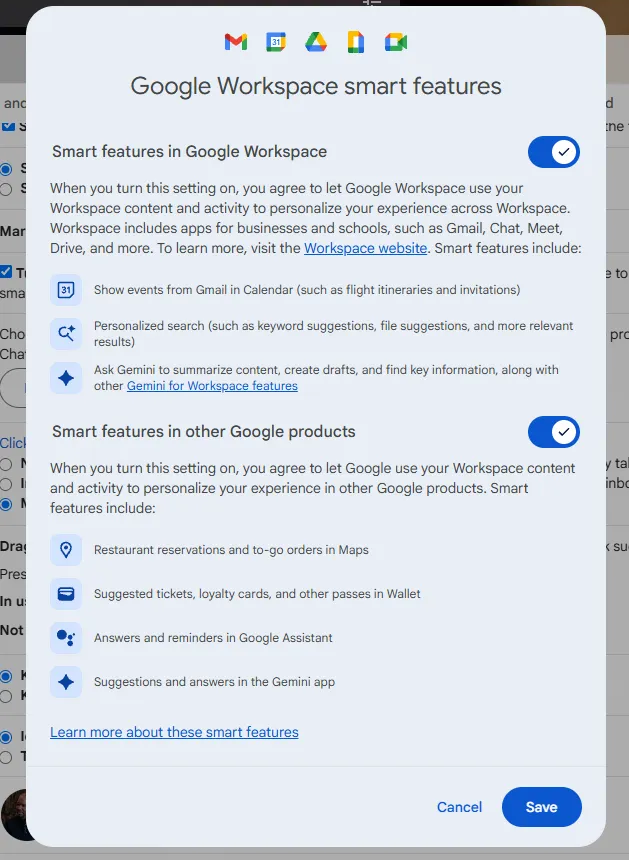
A buried Gmail setting let Gemini analyze emails and calendars unless users opted out.
Confusion spread on X and Reddit as people questioned when the feature was enabled.
Google said the system came from long-standing smart features that automate routine tasks.
A toggle buried inside Gmail set off a public firestorm this week after users realized it allowed Google’s Gemini AI to analyze their emails and calendars by default.
Posts across social media showed confusion about when the feature had been enabled and how much personal information it had touched.
The uproar intensified as people complained that Google had given no notice that the feature had been activated. Many users said they had never agreed to anything resembling AI training and were surprised to learn their inboxes and scheduling data supported Gemini unless they turned the setting off themselves.
“You have been automatically opted in to allow Gmail to access all your private messages & attachments to train AI models,” electronics design engineer and content creator Dave Jones wrote on X. You have to manually turn off Smart Features in the settings menu in two locations.”
What Google said
Google said the setting came from its updated Smart Features system across Gmail, Calendar, Drive, Chat, and Meet. The company described the tools as conveniences that relied on Workspace data to handle routine tasks.
Examples included adding flight details from Gmail to Calendar, showing order-tracking summaries, compiling tickets and loyalty cards in Google Wallet, and letting Gemini reference Drive files while drafting emails.
Google said the update gave users more granular controls and did not change its underlying data-handling practices, but noted that these features required access to email, calendar entries, and other Workspace content to work. The problem, however, is that Google did not give users the chance to turn the feature off before it was in use.
Opting out
The Smart Features prompt can be accessed in Gmail’s settings wheel.
“When you turn this setting on, you agree to let Gmail, Chat, and Meet use your content and activity in these products to provide smart features and personalize your experience,” the prompt reads.
After toggling off “Turn on Smart Features in Gmail, Chat, and Meet,” users still need to go to the Manage Workspace Smart Features settings and toggle off Smart Features in Google Workspace and in other Google products to opt out entirely.
“I went immediately to my Settings and the explanatory material,” another user wrote on X. “Google tells me that the Smart Features are off by default in the UK, and this does seem to be true in my case, if they can ever be trusted.”
Google did not respond to a request for comment by Decrypt.
While Google has worked with artificial intelligence and machine learning for more than a decade, the controversy comes at a time when the technology giant is adding AI to all of its products, including Gmail, video, Chat, search, and phones. In October, Google launched Veo 3, its upgraded AI video generator. Earlier this month, it added Gemini to the Google Maps app, and on Tuesday, Google released the latest version of its flagship AI, Gemini 3.
The Gemini backlash is the latest in a long line of complaints and criticisms about how Google handles user data.
not to undermine what’s happening on this app but yall know AI had been getting trained on your data for a long time now right? if you ever posted to FB or Instagram it helped AI learn facial recognition; Google uses your Gmail to train AI to finish sentences, and on and on
In 2014, the company acknowledged scanning user emails to protect against malware and spam while tailoring the user experience.
“Our automated systems analyse your content (including emails) to provide you personally relevant product features, such as customised search results, tailored advertising, and spam and malware detection,” Google’s Terms of Service said at the time. “This analysis occurs as the content is sent, received, and when it is stored.”
Some users on Reddit voiced deeper distrust, arguing that the new setting changed little about how Google handled their data.
“They’re scanning your email anyway, Gemini or not. They already know everything that’s in there, so opting out makes no difference. The option to opt out is there to provide a placebo sense of privacy,” a Redditor wrote. “The only way out is to not use Gmail. Even if you do opt out, they will still use your email to train their model. There’s just too much data, and data is too valuable not to use, even if it’s illegal.”
The episode showed the challenge of adding generative AI into products used by more than a billion people. As Google pushed Gemini deeper into its productivity suite, the reaction suggested many users remained unclear about when their personal communication data was involved.
Generally Intelligent Newsletter
A weekly AI journey narrated by Gen, a generative AI model.
The FSNN News Room is the voice of our in-house journalists, editors, and researchers. We deliver timely, unbiased reporting at the crossroads of finance, cryptocurrency, and global politics, providing clear, fact-driven analysis free from agendas.
We and our selected partners wish to use cookies to collect information about you for functional purposes and statistical marketing. You may not give us your consent for certain purposes by selecting an option and you can withdraw your consent at any time via the cookie icon.
Cookies are small text that can be used by websites to make the user experience more efficient. The law states that we may store cookies on your device if they are strictly necessary for the operation of this site. For all other types of cookies, we need your permission. This site uses various types of cookies. Some cookies are placed by third party services that appear on our pages.
Your permission applies to the following domains:
https://fsnn.net
Necessary
Necessary cookies help make a website usable by enabling basic functions like page navigation and access to secure areas of the website. The website cannot function properly without these cookies.
Statistic
Statistic cookies help website owners to understand how visitors interact with websites by collecting and reporting information anonymously.
Preferences
Preference cookies enable a website to remember information that changes the way the website behaves or looks, like your preferred language or the region that you are in.
Marketing
Marketing cookies are used to track visitors across websites. The intention is to display ads that are relevant and engaging for the individual user and thereby more valuable for publishers and third party advertisers.


 Freedom Index