

Close Menu
FSNN | Free Speech News NetworkFSNN | Free Speech News Network
  • Home
  • News
    • Politics
    • Legal & Courts
    • Tech & Big Tech
    • Campus & Education
    • Media & Culture
    • Global Free Speech
  • Opinions
    • Debates
  • Video/Live
  • Community
  • Freedom Index
  • About
    • Mission
    • Contact
    • Support
Trending

The Decision that Saved Democracy,” by Bradley A. Smith

15 seconds ago

Nubank wins conditional U.S. banking approval as regulators reopen door to crypto

30 minutes ago

Crypto ‘Extreme Fear’ Sentiment Is A Bullish Signal, Says Santiment

31 minutes ago
Facebook X (Twitter) Instagram
Facebook X (Twitter) Discord Telegram
FSNN | Free Speech News NetworkFSNN | Free Speech News Network
Market Data Newsletter
Saturday, January 31
  • Home
  • News
    • Politics
    • Legal & Courts
    • Tech & Big Tech
    • Campus & Education
    • Media & Culture
    • Global Free Speech
  • Opinions
    • Debates
  • Video/Live
  • Community
  • Freedom Index
  • About
    • Mission
    • Contact
    • Support
FSNN | Free Speech News NetworkFSNN | Free Speech News Network
Home»AI & Censorship»What WhatsApp’s “Advanced Chat Privacy” Really Does
AI & Censorship

What WhatsApp’s “Advanced Chat Privacy” Really Does

News RoomBy News Room4 months agoNo Comments5 Mins Read361 Views
Share Facebook Twitter Pinterest Copy Link LinkedIn Tumblr Email VKontakte Telegram
What WhatsApp’s “Advanced Chat Privacy” Really Does
Share
Facebook Twitter Pinterest Email Copy Link

Listen to the article

0:00
0:00

Key Takeaways

Playback Speed

Select a Voice

In April, WhatsApp launched its “Advanced Chat Privacy” feature, which, once enabled, disables using certain AI features in chats and prevents conversations from being exported. Since its launch, an inaccurate viral post has been ping-ponging around social networks, creating confusion around what exactly it does.

The viral post falsely claims that if you do not enable Advanced Chat Privacy, Meta’s AI tools will be able to access your private conversations. This isn’t true, and it misrepresents both how Meta AI works and what Advanced Chat Privacy is.

The confusion seems to spawn from the fact that Meta AI can be invoked through a number of methods, including in any group chat with the @Meta AI command. While the chat contents between you and other people are always end-to-end encrypted on the app, what you say to Meta AI is not. Similarly, if you or anyone else in the chat chooses to use Meta AI’s “Summarize” feature, which uses Meta’s “Private Processing” technology, that feature routes the text of the chat through Meta’s servers. However, the company claims that they cannot view the content of those messages. This feature remains opt-in, so it’s up to you to decide if you want to use it. The company also recently released the results of two audits detailing the issues that have been found thus far and what they’ve done to fix it.

For example, if you and your buddy are chatting, and your friend types in @Meta AI and asks it a question, that part of the conversion, which you can both see, is not end-to-end encrypted, and is usable for AI training or whatever other purposes are included in Meta’s privacy policy. But otherwise, chats remain end-to-end encrypted.

Advanced Chat Privacy offers some bit of control over this. The new privacy feature isn’t a universal setting in WhatsApp; you can enable or disable it on a per-chat basis, but it’s turned off by default. When enabled, Advanced Chat Privacy does three core things:

  • Blocks anyone in the chat from exporting the chats,
  • Disables auto-downloading media to chat participant’s phones, and
  • Disables some Meta AI features

Outside disabling some Meta AI features, Advanced Chat Privacy can be useful in other instances. For example, while someone can always screenshot chats, if you’re concerned about someone easily exporting an entire group chat history, Advanced Chat Privacy makes this harder to do because there’s no longer a one-tap option to do so. And since media can’t be automatically downloaded to someone’s phone (the “Save to Photos” option on the chat settings screen), it’s harder for an attachment to accidentally end up on someone’s device.

How to Enable Advanced Chat Privacy

Advanced Chat Privacy is enabled or disabled per chat. To enable it:

  • Tap the chat name at the top of the screen.
  • Select Advanced chat privacy, then tap the toggle to turn it on.

There are some quirks to how this works, though. For one, by default, anyone involved in a chat can turn Advanced Chat Privacy on or off at will, which limits its usefulness but at least helps ensure something doesn’t accidentally get sent to Meta AI.
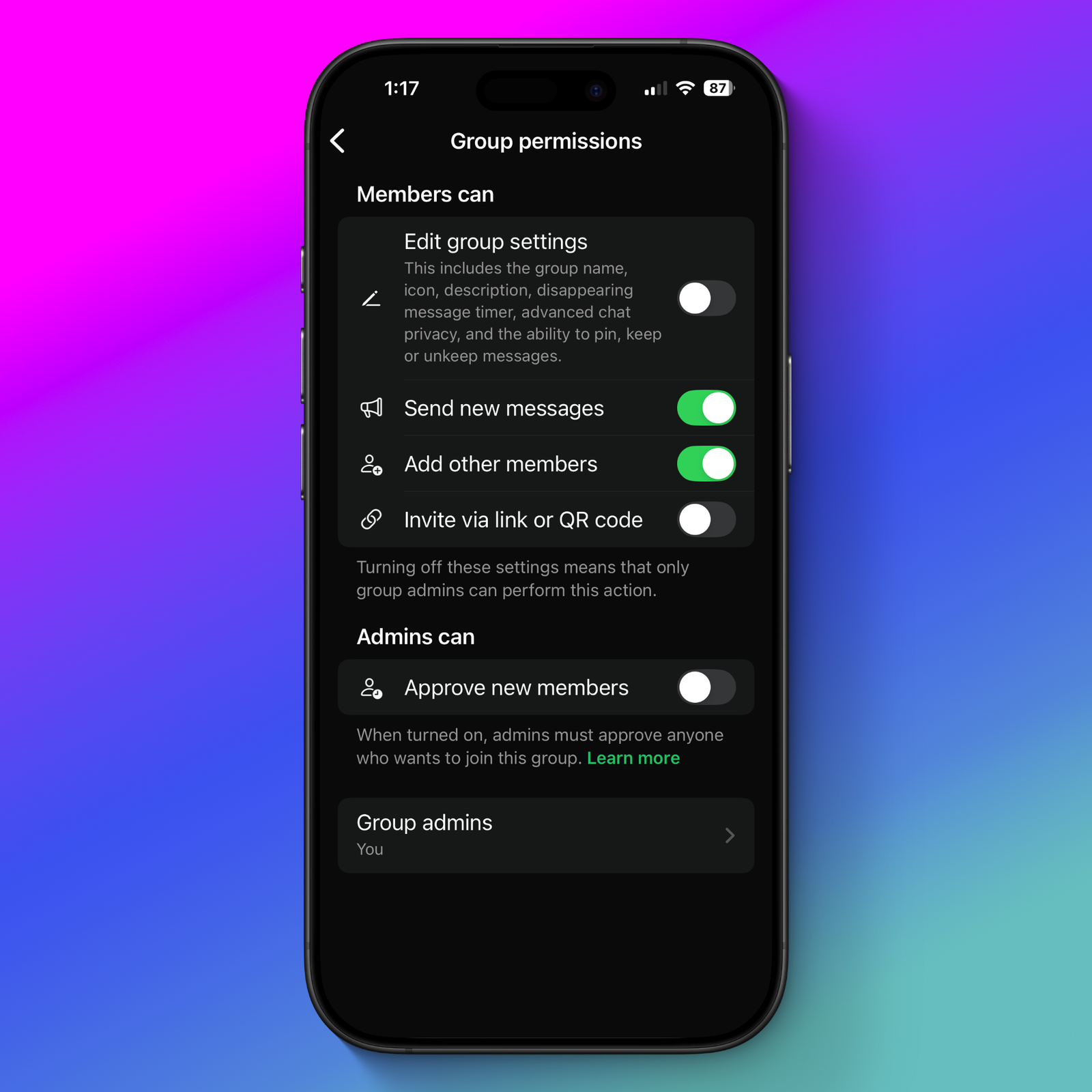
whatsapp group permissions screen

There’s one way around this, which is for a group admin to lock down what users in the group can do. In an existing group chat that you are the administrator of, tap the chat name at the top of the screen, then:

  • Scroll down to Group Permissions.
  • Disable the option to “Edit Group Settings.” This makes it so only the administrator can change several important permissions, including Advanced Chat Privacy.

You can also set this permission when starting a new group chat. Just be sure to pop into the permissions page when prompted. Even without Advanced Chat Privacy, the “Edit Group Settings” option is an important one for privacy, because it also includes whether participants can change the length that disappearing messages can be viewed, so it’s something worth considering for every group chat you’re an administrator of, and something WhatsApp should require admins to choose before starting a new chat.

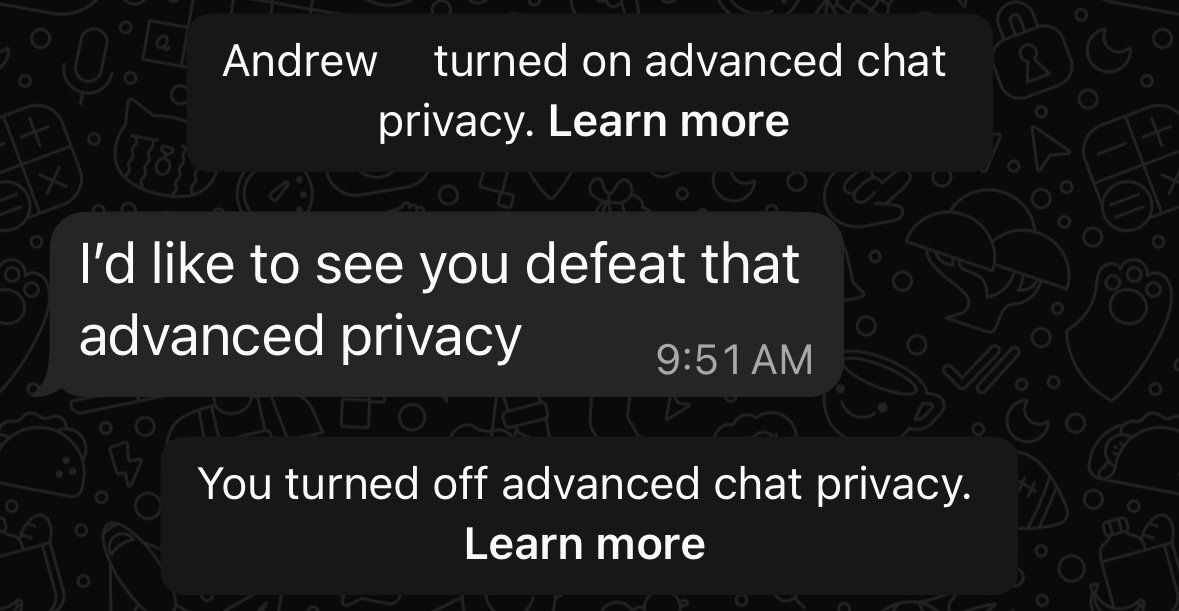
When it comes to one-on-one chats, there is currently no way to block the other person from changing the Advanced Chat Privacy feature, so you’ll have to come to an agreement with the other person on keeping it enabled if that’s what you want. If the setting is changed, you’ll see a notice in the chat stating so:
There are already serious concerns with how much metadata WhatsApp collects, and as the company introduces ads and AI, it’s going to get harder and harder to navigate the app, understand what each setting does, and properly protect the privacy of conversations. One of the reasons alternative encrypted chat options like Signal tend to thrive is because they keep things simple and employ strong default settings and clear permissions. WhatsApp should keep this in mind as it adds more and more features.

Read the full article here

Fact Checker

Verify the accuracy of this article using AI-powered analysis and real-time sources.

Get Your Fact Check Report

Enter your email to receive detailed fact-checking analysis

5 free reports remaining

Continue with Full Access

You've used your 5 free reports. Sign up for unlimited access!

Already have an account? Sign in here

Share. Facebook Twitter Pinterest LinkedIn Tumblr Email Telegram Copy Link
News Room
  • Website
  • Facebook
  • X (Twitter)
  • Instagram
  • LinkedIn

The FSNN News Room is the voice of our in-house journalists, editors, and researchers. We deliver timely, unbiased reporting at the crossroads of finance, cryptocurrency, and global politics, providing clear, fact-driven analysis free from agendas.

Related Articles

Media & Culture

DOJ Arrests Journalists Don Lemon & Georgia Fort For Acts Of Journalism, Even After Courts Rejected Arrest Warrants

3 hours ago
Media & Culture

Daily Deal: Cable Blocks Magnetic And Weighted Cord Organizers

8 hours ago
Media & Culture

Bari Weiss Pauses Her Pathetic Podcast To Focus Full Time On Ruining CBS

9 hours ago
Media & Culture

Need A Friday Night Challenge? Whip Up A Quick Game For The Public Domain Game Jam!

10 hours ago
Media & Culture

Tom Homan To Minneapolis: Look, I Warned You If You Weren’t Nice, We’d Have To Kill Again, And Look What You Made Us Do

11 hours ago
Media & Culture

The Casual Cruelty Of The GOP’s Migrant Purge

12 hours ago
Add A Comment

Comments are closed.

Editors Picks

Nubank wins conditional U.S. banking approval as regulators reopen door to crypto

30 minutes ago

Crypto ‘Extreme Fear’ Sentiment Is A Bullish Signal, Says Santiment

31 minutes ago

South Carolina Gave $1.3 Billion to Scout Motors. It’s Already $150 Million Over Budget.

1 hour ago

President Donald Trump nominates Kevin Warsh as Fed Chair

2 hours ago
Latest Posts

Bitcoin’s $80K Last Support At Risk: Will Altcoins Follow?

2 hours ago

My New Lawfare Article on “Minnesota’s Compelling Tenth Amendment Case Against Trump’s ICE Surge”

2 hours ago

Professor Wins Free Speech Case Over Land Acknowledgement

2 hours ago

Subscribe to News

Get the latest news and updates directly to your inbox.

At FSNN – Free Speech News Network, we deliver unfiltered reporting and in-depth analysis on the stories that matter most. From breaking headlines to global perspectives, our mission is to keep you informed, empowered, and connected.

FSNN.net is owned and operated by GlobalBoost Media
, an independent media organization dedicated to advancing transparency, free expression, and factual journalism across the digital landscape.

Facebook X (Twitter) Discord Telegram
Latest News

The Decision that Saved Democracy,” by Bradley A. Smith

15 seconds ago

Nubank wins conditional U.S. banking approval as regulators reopen door to crypto

30 minutes ago

Crypto ‘Extreme Fear’ Sentiment Is A Bullish Signal, Says Santiment

31 minutes ago

Subscribe to Updates

Get the latest news and updates directly to your inbox.

© 2026 GlobalBoost Media. All Rights Reserved.
  • Privacy Policy
  • Terms of Service
  • Our Authors
  • Contact

Type above and press Enter to search. Press Esc to cancel.

🍪

Cookies

We and our selected partners wish to use cookies to collect information about you for functional purposes and statistical marketing. You may not give us your consent for certain purposes by selecting an option and you can withdraw your consent at any time via the cookie icon.

Cookie Preferences

Manage Cookies

Cookies are small text that can be used by websites to make the user experience more efficient. The law states that we may store cookies on your device if they are strictly necessary for the operation of this site. For all other types of cookies, we need your permission. This site uses various types of cookies. Some cookies are placed by third party services that appear on our pages.

Your permission applies to the following domains:

  • https://fsnn.net
Necessary
Necessary cookies help make a website usable by enabling basic functions like page navigation and access to secure areas of the website. The website cannot function properly without these cookies.
Statistic
Statistic cookies help website owners to understand how visitors interact with websites by collecting and reporting information anonymously.
Preferences
Preference cookies enable a website to remember information that changes the way the website behaves or looks, like your preferred language or the region that you are in.
Marketing
Marketing cookies are used to track visitors across websites. The intention is to display ads that are relevant and engaging for the individual user and thereby more valuable for publishers and third party advertisers.